From Ask Mode to Agent Mode
This is a first learning hour for people who have mainly used AI-powered inline suggestions, ChatGPT or GitHub Copilot in Ask mode. It is meant as an introduction for tools like GitHub Copilot Agent mode, Codex, Claude Code, Amp, Pi, OpenCode etc. For the remainder of the Learning Hour, we’ll use GitHub Copilot as an example.
Learning Goals
- Describe how GitHub Copilot Agent mode differs from “Ask mode” or AI-powered autocomplete.
- Use an AI Agent to inspect, change and verify code via prompting.
Session Outline
- 5 min connect: Give some examples of what you have already used AI for?
- 5 min concept: The Agent Loop
- 10 min demo: Using an AI Agent to refactor
- 30 min concrete practice: Use an AI Agent
- 5 min conclusion: Explain the main idea
Connect - Give some examples of what you have already used AI for?
Pose an open question and ask people to write notes with their answers. If you don’t understand something they write, ask them to explain verbally. There are no wrong answers or right answers you are looking for, you are connecting to what they already know. This is not supposed to be a long discussion or analysis: acknowledge their experiences and move on.
This is an Open Question connect.
Concept - The Agent Loop
Show the relationship diagram and explain it:
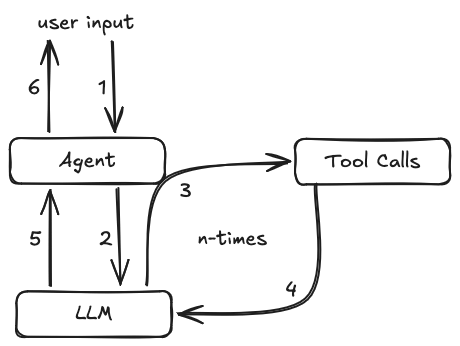
The agent loop is the basic pattern used by AI coding agents.
The agent takes user input and forwards it to the model.
When a response comes back, it usually contains tool call instructions.
The agent then uses its tools, like reading and editing files or executing bash commands such as npm test, and feeds the results back into the model.
This repeats until the model’s response contains no more tool calls.
Then the final response is presented to the user, and the agent waits for input again.
Agents also use additional instructions, for example from a system prompt, available skills, MCP configuration or the content of the AGENTS.md file.
We leave those out for this learning hour, so we can focus on the basic agent loop without introducing too many extra concepts.
Demo - Using an AI Agent to refactor
Open a small project like WarehouseDeskApp that has some poorly written code that could be improved by refactoring. Briefly explain the interface of the coding agent, highlight model choice and approval settings, and in case of Copilot, how to switch from Ask mode to Agent mode.
For the harness-engineering-kata, good prompts for a demo can be:
Build this project, verify that it compiles and what it prints to the console.
Refactor, introduce a value object for quantity. Compile the code afterwards and verify that the output stays the same.
Commit the changes we made. Follow the project’s commit notation.
The focus should be on the Agent loop and how tools are used that allow the agent to verify its work.
Concrete Practice - Use an AI agent
Split into pairs and give them the same code that you showed in the demo, with the same AI tooling already set up. Ask them to do similar design improvement tasks using the Agentic setup. Go round and help if anyone gets stuck and answer questions - try to get every pair to the point where the agent has made acceptable code changes without manual intervention, and they were prepared to commit the results.
Conclusions
Ask people to explain the main idea with a question similar to this:
- What can Agent mode do that Ask mode cannot?